Appearance
vue3 部分知识点
ref, reactive
ref:把原始值包裹成一个对象,通过访问器属性(get/set)拦截 .value 的读写,从而实现响应式。
reactive:核心是通过 Proxy 拦截对象操作。
reactive定义的对象直接赋值会失去响应式
let state = reactive({ list: [] })
// 页面不更新
state = [{ name: 'xxx' }]
解决方案1:
使用Object.assign或修改内部属性
let state = reactive({
  list: [
    { name: "name1", age: 18 },
    { name: "name2", age: 19 }
  ]
})
const updateList = () => {
  // Object.assign(state, {
  //   list: [
  //     { name: "new name1", age: 20 },
  //     { name: "new name2", age: 21 }
  //   ]
  // })
  state.list = [
    { name: "new name1", age: 20 },
    { name: "new name2", age: 21 }
  ]
}
解决方案2:
使用push、splice等方法修改原数组
let state = reactive([
  { name: "name1", age: 18 },
  { name: "name2", age: 19 }
])
const updateList = () => {
  state.splice(0, state.length, ...[
    { name: "new name1", age: 20 },
    { name: "new name2", age: 21 }
  ])
}
解决方案3:
对需要整体替换的场景使用 ref
let state = ref([
  { name: "name1", age: 18 },
  { name: "name2", age: 19 }
])
const updateList = () => {
  state.value = [
    { name: "new name1", age: 20 },
    { name: "new name2", age: 21 }
  ]
}
toRefs, toRef, unref
let person = reactive({
  name: '张三',
  age: 19
})
// 解构出来的name不是响应式的,因为响应式代理的是对象本身,解构赋值相当于把值 复制 出来了,脱离了响应式系统
let { name, age } = person
function changeName() {
  name += '~' // 页面不会更新
}
let { name } = toRefs(person)
console.log('name---', name) // ObjectRefImpl
function changeName() {
name.value += '~' // person.name 会改变
}
// or
let name = toRef(person, 'name')
console.log('name---', name) // ObjectRefImpl
function changeName() {
name.value += '~'
}let name1 = unref(name)
setTimeout(() => {
name1 = '该变量失去响应式'
}, 2000)computed
let num1 = ref(0)
let num2 = ref(0)
// let sum = computed(() => {
//   return (parseFloat(num1.value) || 0) + (parseFloat(num2.value) || 0)
// })
// // computed 计算有缓存,只读
// function changeComputedValue() {
//   sum.value = 222 // computed value is readonly
// }
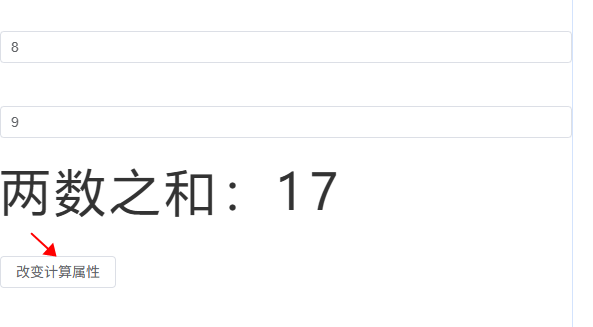
let sum = computed({
  get() {
    return (parseFloat(num1.value) || 0) + (parseFloat(num2.value) || 0)
  },
  set(val) {
    // console.log('value', val)
    const [n1, n2] = val.split('-')
    num1.value = n1
    num2.value = n2
  }
})
function changeComputedValue() {
  sum.value = '8-9' // 触发 set 方法, num1,num2和sum都改变
}
watch
watch 可以监听:
- ref 定义的数据
- reactive 定义的数据
- 监听响应式对象某个属性
- 一个包含上述内容的数组
ref 定义的基本类型
let val1 = ref(0)
const stopWatch = watch(val1, (newValue, oldValue) => {
  console.log(newValue, oldValue)
  if (newValue >= 10) {
    stopWatch() // 移除监听
  }
})
function changeSum() {
  val1.value += 1
}
ref 定义的对象类型
let val2 = ref({
  name: 0
})
// val2对象的地址值变化才能监听到;只改name监听不到
watch(val2, (newValue) => {
  console.log('监听val2变化', newValue)
})
function changeVal2Name() {
  // val2.value.name += '~' // 监听不到
  val2.value = { name: 1 }
}
优化:
let val2 = ref({
  name: 0
})
watch(
  val2,
  (newValue, oldValue) => {
    // val2.value.name += '~' => newValue, oldValue 都是新值,因为它们是同一个对象 (true)
    console.log('监听val2变化', newValue, oldValue, newValue === oldValue)
    // val2.value = { name: 1 } => newValue是新值,oldValue是旧值,不是一个对象了 (false)
  },
  { deep: true } // 需要开启deep才能监听到ref定义的对象属性变化
  // immediate: true
)
function changeVal2Name() {
  val2.value.name += '~'
  // val2.value = { name: 1 }
}
reactive 定义的对象类型
let val3 = reactive({
  name: 0
})
// reactive定义的对象类型监听时默认开启了深度监听deep,且无法关闭
watch(val3, (newValue) => {
  console.log('监听val3变化', newValue)
})
function changeVal3Name() {
  Object.assign(val3, { name: 999 })
}
一个函数返回一个值(getter 函数)
监听响应式对象某个属性,且该属性是基本类型:
let val3 = reactive({
  name: 0,
  age: 18
})
watch(
  () => val3.name,
  (newValue) => {
    console.log('监听val3.name变化', newValue)
  }
)
function changeVal3Name() {
  val3.name = 888
}
监听响应式对象某个属性,且该属性是对象类型:
这种写法兼听不到对象整体改变:
let val3 = reactive({
  name: 0,
  age: 18,
  obj: {
    count: 1
  }
})
watch(val3.obj, (newValue) => {
  console.log('监听val3.obj变化', newValue)
})
function changeVal3Name() {
  val3.obj.count = 2
  // val3.obj = { count: 3 } // 整体改变,这个监听obj监听不到
}
这种写法监听不到属性改变:
let val3 = reactive({
  name: 0,
  age: 18,
  obj: {
    count: 1
  }
})
watch(
  () => val3.obj,
  (newValue) => {
    console.log('监听val3.obj变化', newValue)
  }
)
function changeVal3Name() {
  // val3.obj.count = 2 // 这个写法属性改变监听不到
  val3.obj = { count: 3 }
}
优化:
就采用这种写法:
let val3 = reactive({
  name: 0,
  age: 18,
  obj: {
    count: 1
  }
})
watch(
  () => val3.obj,
  (newValue) => {
    console.log('监听val3.obj变化', newValue)
  },
  {
    deep: true
  }
)
function changeVal3Name() {
  // val3.obj.count = 2 // 2种写法都能监听到
  val3.obj = { count: 3 }
}
监听一个包含上述内容的数组
watch(
  [val2, () => val3.obj],
  (newValue, oldValue) => {
    console.log('监听', newValue, oldValue)
  },
  {
    deep: true
  }
)
watchEffect
watchEffect 响应式地追踪其依赖,并在依赖更改时重新执行该函数
watchEffect(() => {
  console.log('一上来就执行一次watchEffect')
  // num1、num2 任何一个发生变化都会执行
  if (num1.value >= 10 || num2.value >= 10) {
    console.log('超过10')
  }
  return () => {
    // 组件卸载 watchEffect 会自动停止
    console.log('Cleaning up...')
  }
})
watchEffect((onInvalidate) => {
const timer = setInterval(() => {
...
}, 1000)
// 清理函数:组件卸载或依赖变化时执行
onInvalidate(() => {
clearInterval(timer)
})
})v-memo
长列表或复杂组件,可以使用v-memo缓存渲染结果,仅当依赖数据变化时才重新渲染,减少 DOM 操作。
标签 ref 属性
用在 html 标签上:
<template>
  <div>
    <div ref="refEle">dom</div>
  </div>
</template>

<script setup>
import { ref, onMounted } from 'vue'

const refEle = ref(null)
onMounted(() => {
  console.log(refEle.value)
})
</script>
用在子组件上:
如果不用 defineExpose 暴露出去,父组件无法访问子组件内容
// 父组件
<CommonHeader ref="compRef" />

let compRef = ref()
onMounted(() => {
  console.log(compRef.value, compRef.value.keywords)
  ...
}

// 子组件
import { ref, defineExpose } from 'vue'
let keywords = ref('test')
defineExpose({ keywords })
组件 props 和 自定义事件
父组件:
<template>
  <Person a="哈哈" :list="personList" />
</template>

<script setup lang="ts">
import Person from './components/Person.vue'
import { reactive } from 'vue'
import { type Persons } from './types'

// const personList: Persons = reactive([
//   {
//     id: '1',
//     name: 'xhh',
//     age: 19,
//   },
//   {
//     id: '2',
//     name: 'lb',
//     age: 20,
//   },
// ])
// or 泛型
const personList = reactive<Persons>([
  {
    id: '1',
    name: 'xhh',
    age: 19,
  },
  {
    id: '2',
    name: 'lb',
    age: 20,
  },
])
</script>
src/types/index.ts:
// 接口
export interface PersonInter {
  id: string
  name: string
  age: number
}

// 自定义类型
// export type Persons = Array<PersonInter>
// or
export type Persons = PersonInter[]
子组件:
const x = defineProps(['a', 'list'])
console.log(x, x.a, x.list)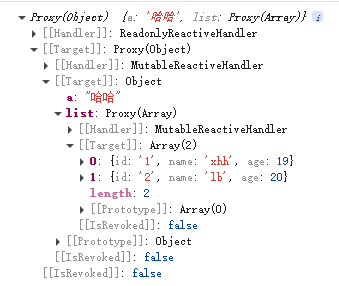
加上类型校验:
import { type Persons } from '@/types'

defineProps<{ list: Persons }>()
类型校验+可选传参:
父组件不传 list 也可以
import { type Persons } from '@/types'

defineProps<{ list?: Persons }>()
类型校验+可选传参+默认值:
// [@vue/compiler-sfc] `withDefaults` is a compiler macro and no longer needs to be imported.
// import { withDefaults } from 'vue'
import { type Persons } from '@/types'

withDefaults(defineProps<{ list?: Persons }>(), {
  list: () => [
    {
      id: '2-2',
      name: 'haha',
      age: 24,
    },
  ],
})
defineEmits 自定义事件(子传父)
const emit = defineEmits(['update:title', 'submit'])

const handleClick = () => {
  emit('update:title', '标题')
  emit('submit', { data: '提交数据' })
}
TypeScript 写法:
// 方式1:数组声明
const emit = defineEmits<{
  (e: 'update:title', value: string): void
  (e: 'submit', data: any): void
}>()

// 方式2:Vue 3.3+ 对象声明
const emit = defineEmits<{
  'update:title': [value: string]
  'submit': [data: any]
}>()
Router
创建路由:
import { createRouter, createWebHistory } from 'vue-router'

const router = createRouter({
  history: createWebHistory(import.meta.env.BASE_URL), // vite.config.js 里的 base 设置
  routes: [
    {
      path: '/login',
      name: 'login',
      meta: {
        title: '登录'
      },
      component: () => import('../views/login') // import 路由懒加载
    },
    ...
  ],
  scrollBehavior: () => {
    // 新开页面滚动条回到顶部
    return { top: 0 }
  }
})

export default router
挂载路由:
import { createApp } from 'vue'
import router from './router'

const app = createApp(App)
app.use(router)
渲染出匹配到的路由:
<RouterView :key="$route.fullPath" />接收参数
import { useRouter, useRoute } from 'vue-router'
const router = useRouter()
const route = useRoute()

console.log('route:', route)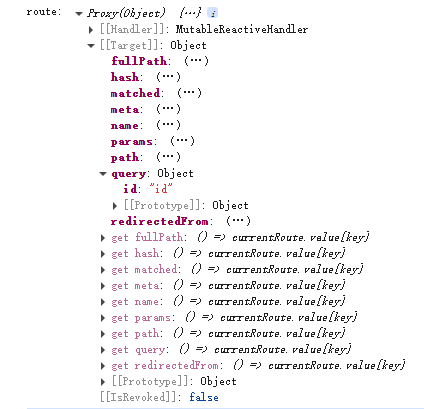
console.log('router.currentRoute.value:', router.currentRoute.value)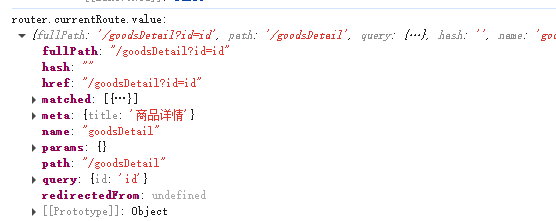
路由规则的 props 配置
{
  path: '/waterfallPage',
  name: 'waterfallPage',
  meta: {
    title: '瀑布流'
  },
  component: () => import('../views/waterfallPage'),
  children: [
    // 嵌套路由 /waterfallPage/waterfall
    {
      path: 'waterfall/:a?/:b?',
      name: 'waterfall',
      meta: {
        title: '瀑布流子页面'
      },
      component: () => import('../views/waterfall'),
      // <waterfall a="" b="" />
      // props: true // 写法一、将路由收到的所有params参数作为props传递给路由组件
      props(route) {
        // 写法二、自己决定将什么作为props传递给路由组件
        // return route.query
        return route.params
      }
      // props: {
      //   // 写法三
      //   a: 100
      // }
    }
  ]
}
页面接收:
defineProps(['a', 'b'])replace
<RouterLink replace to="/goodsDetail?id=2">goodsDetail</RouterLink>

router.replace({
  name: 'confirmOrder'
})
重定向
{
  path: '/',
  redirect: '/home'
}
defineAsyncComponent
仅在路由匹配或交互触发时加载组件,避免加载未使用的组件资源。
路由匹配:
const routes = [
  {
    path: '/home',
    component: () => import('@/views/home')
  }
]
Vue Router的import()语法,底层就是用的defineAsyncComponent
交互触发:
// show 为 true 时才加载 AboutComp
<AboutComp v-if="show" />
const AboutComp = defineAsyncComponent(() => import('../About.vue'))
const MyComponentComp = defineAsyncComponent({
loader: () => import('./MyComponent.vue'),
loadingComponent: LoadingComponent, // 加载中的组件
errorComponent: ErrorComponent, // 错误时的组件
delay: 200, // 延迟200ms再显示loading组件
timeout: 3000, // 超时时间
})keep-alive
keep-alive 缓存组件
场景:从首页 home 进入列表页 list,不需要缓存;从列表页进入详情页 detail,再从详情页返回到列表页,这时列表页需要使用上次缓存的内容不要刷新。
App.vue
<script setup>
import { watch, ref } from 'vue'
import { useRoute } from 'vue-router'
const route = useRoute()

let cachedComponents = ref([])
watch(route, (val) => {
    if (val.name === 'home') {
      cachedComponents.value = ['']
    } else {
      cachedComponents.value = ['list'] // 组件的name
    }
  }, { immediate: true }
)
</script>

<template>
  <router-view v-slot="{ Component }">
    <keep-alive :include="cachedComponents">
      <component :is="Component" />
    </keep-alive>
  </router-view>
</template>
list 页面生命周期:
import { onMounted, onActivated, onDeactivated } from 'vue'

onMounted(() => {
  // 从首页进入 触发
  // 从详情页返回 不再触发,list被缓存,不走 mounted 了
  console.log('onMounted')
})
onActivated(() => {
  // 从首页进入 触发
  // 从详情页返回 触发
  console.log('active')
})
onDeactivated(() => {
  // 离开列表页 触发
  console.log('inactive')
})
缓存的list页面保留上次滚动位置:
const router = createRouter({
  history: createWebHistory(import.meta.env.BASE_URL),
  routes: [...],
  scrollBehavior: (to, from) => {
    if (to.path !== '/list' || (to.path === '/list' && from.path === '/home')) {
      // 新开页面滚动条回到顶部
      return { top: 0 }
    }
  }
})
vue2 keep-alive 配置:
<template>
  <div id="app">
    <keep-alive :include="cachedViews">
      <router-view />
    </keep-alive>
  </div>
</template>

<script>
export default {
  name: 'App',
  data() {
    return {
      cachedViews: ['list']
    }
  },
  watch: {
    '$route': {
      handler(val) {
        if (val.name === 'home') {
          this.cachedViews = []
        } else {
          this.cachedViews = ['list']
        }
      },
      immediate: true
    }
  }
}
</script>
pinia
引入 pinia
import { createPinia } from 'pinia'
const pinia = createPinia()
app.use(pinia)
创建 store(目录 src/store):
import { defineStore } from 'pinia'

// 官方推荐命名格式
export const useCounterStore = defineStore('counter', {
  state() {
    // 存储数据
    return {
      count: 0
    }
  },
  getters: {
    double: (state) => state.count * 2
  },
  actions: {
    // 修改状态(支持同步/异步)
    increment(value) {
      this.count += value
    }
  }
})
使用 store:
import { useCounterStore } from '@/store/counter'
const counter = useCounterStore()
console.log('获取 store count:', counter.count, counter.$state.count)

function addShopCart() {
  // pinia
  // counter.count += 1
  // or
  counter.$patch({
    count: counter.count + 1
  })
  // or
  // counter.$patch((state) => {
  //   state.count = counter.count + 1
  // })
  // or
  // counter.increment(1)
}
持久化存储
localStorage 或 pinia-plugin-persistedstate 插件
storeToRefs
// 这种写法不是响应式数据,修改了count页面上的countValue不更新
let countValue = counter.count

console.log('--toRefs(counter)--', toRefs(counter)) // 不建议这么写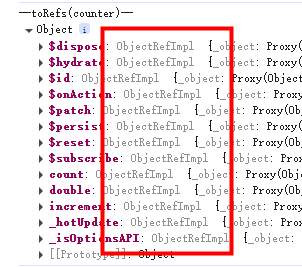
// storeToRefs 获取响应式数据,只会关注store中的数组,不会对方法进行ref包裹
let countValue = storeToRefs(counter).count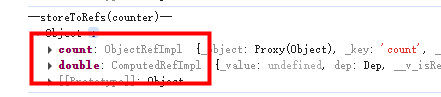
$subscribe
counter.$subscribe((mutate, state) => {
  // store中的数据发生了变化
  console.log('$subscribe:', mutate, state.count)
})
组合式写法
// store 组合式写法
import { ref, computed } from 'vue'
export const useCounterStore = defineStore('counter', () => {
  const count = ref(localStorage.getItem('storeCount') || 0)
  const double = computed(() => count.value * 2)
  function increment(value) {
    count.value += value
  }
  return { count, double, increment }
})


counter.$subscribe((mutate, state) => {
  // store中的数据发生了变化
  localStorage.setItem('storeCount', state.count)
  console.log('$subscribe:', mutate, state.count)
})
v-model
用在 input 等标签上
<input v-model="keyword" />
// or
<input
  :value="keyword"
  @input="keyword = (<HTMLInputElement>$event.target).value"
  placeholder="请输入"
/>
用在自定义组件上
// 父组件
keyword: {{ keyword }}
<XhhInput v-model="keyword" />
// 等同于
<XhhInput :modelValue="keyword" @update:modelValue="keyword = $event" />
<!-- 对于自定义事件,$event就是触发事件时所传递的数据,不能 .target -->

// 子组件
<template>
  <input
    :value="modelValue"
    @input="emit('update:modelValue', (<HTMLInputElement>$event.target).value)"
    placeholder="请输入"
  />
  <!-- 原生事件,$event就是事件对象,$event.target就是input元素 -->
</template>

<script lang="ts" setup>
defineProps(['modelValue'])
const emit = defineEmits(['update:modelValue'])
</script>
或 子组件使用 v-model 绑定传来的变量:
<template>
  <input v-model="newValue" placeholder="请输入" />
</template>

<script lang="ts" setup>
import { computed } from 'vue'
const props = defineProps(['modelValue'])
const emit = defineEmits(['update:modelValue'])

const newValue = computed({
  get() {
    return props.modelValue
  },
  set(val) {
    emit('update:modelValue', val)
  },
})
</script>
或 Vue3.4+ defineModel 宏:
<template>
  <input v-model="modelValue" />
</template>

<script lang="ts" setup>
const modelValue = defineModel()
// defineModel() 返回的是 ref,会自动与父组件的 v-model 值保持同步
// modelValue.value = "xxx"
</script>
v-model 修改绑定的变量
<XhhInput v-model:modelValueOther="keyword" />
<XhhInput v-model:modelValueOther="keyword" v-model:xyz="abc" />

<template>
  <input
    :value="modelValueOther"
    @input="emit('update:modelValueOther', (<HTMLInputElement>$event.target).value)"
    placeholder="请输入"
  />
</template>

<script lang="ts" setup>
defineProps(['modelValueOther'])
const emit = defineEmits(['update:modelValueOther'])
</script>
插槽
默认插槽
子组件:
<slot></slot>
// 等同于
<slot name="default"></slot>
具名插槽
子组件 Child.vue:
<div>
  <div>Person组件:</div>
  <slot name="header"></slot>
  <slot name="title"></slot>
</div>
父组件:
<Child>
  <template v-slot:title>
    <div>this is title</div>
  </template>
  <template #header>
    <div>this is header</div>
  </template>
</Child>
作用域插槽
子组件 Child.vue:
<slot :listP="list"></slot>

import { reactive } from 'vue'
const list = reactive([
  {
    title: '标题1',
  },
  {
    title: '标题2',
  },
  {
    title: '标题3',
  },
  {
    title: '标题4',
  },
])
父组件:
<Child>
  <template v-slot="params">
    <ul>
      <li v-for="(item, index) in params.listP" :key="index">
        {{ item.title }}
      </li>
    </ul>
  </template>
</Child>

<Child>
  <template v-slot="{ listP }">
    <ol>
      <li v-for="(item, index) in listP" :key="index">
        {{ item.title }}
      </li>
    </ol>
  </template>
</Child>
和具名插槽结合在一起:
子组件:
<slot name="listcon" :listP="list"></slot>父组件:
<template v-slot:listcon="{ listP }">
// or
<template #listcon="{ listP }">
shallowRef, shallowReactive
浅代理,只代理对象属性,不代理对象属性的属性
import { shallowRef } from 'vue'
const sum = shallowRef(0)
const person = shallowRef({
  name: 'zs',
  age: 29,
})
function changeSum() { // 生效
  sum.value += 1
}
function changePerson() { // 生效
  person.value = {
    name: 'new name',
    age: 99,
  }
}
function changePersonName() { // 不生效
  person.value.name = 'ls'
}
function changePersonAge() { // 不生效
  person.value.age += 1
}
import { shallowReactive } from 'vue'
const person = shallowReactive({
name: 'zs',
inner: {
age: 18,
},
})
function changePersonName() { // 生效
person.name = 'ls'
}
function changePersonAge() { // 不生效
person.inner.age += 1
}triggerRef
强制触发对 shallowRef 内层属性的响应
import { shallowRef, triggerRef } from 'vue'

// 使用 shallowRef,只有 .value 是响应式的,内部不做深代理
const bigDeepData = shallowRef({
  list: Array(100).fill(null).map((_, i) => ({
    id: i,
    info: { detail: { deep: { num: i } } }
  }))
})

const updateDeep = () => {
  bigDeepData.value.list[0].info.detail.deep.num = 999999
  triggerRef(bigDeepData)  // 手动触发更新,强制刷新界面
}
readonly, shallowReadonly
readonly 只读,不可修改
sum 可以改,改了 sum2 也跟着变; 但是 sum2 无法修改,数据保护
const sum = ref(0)
const sum2 = readonly(sum)
shallowReadonly: 只作用于对象的顶层属性
const person = reactive({
  name: 'zs',
  inner: {
    age: 18,
  },
})
// person2的name不能改,person2.inner.age可以改
const person2 = shallowReadonly(person)
toRaw, markRaw
toRaw: 获取响应式对象的原始对象,返回的对象不再响应式
let newPerson = toRaw(person)
markRaw: 标记对象,使其永远不会成为响应式对象
import { reactive, markRaw } from 'vue'
const person = markRaw({ // 不是响应式
  name: 'zs',
  age: 18,
})
const person2 = reactive(person) // 不会成为响应式
使用场景: 为了防止误把第三方库变为响应式对象
import mockjs from 'mockjs'

let mockJs = markRaw(mockjs)
customRef
作用:创建一个自定义的 ref,并对其依赖项跟踪和更新触发进行逻辑控制。
自定义customRef实现防抖功能:
import { customRef } from 'vue'

function debouncedRef(initialValue: string, delay: number = 300) {
  let timer: number
  return customRef((track, trigger) => {
    return {
      get() {
        track() // 告诉Vue追踪这个值,一旦msg变化就更新页面
        return initialValue
      },
      set(newValue) {
        clearTimeout(timer)
        timer = setTimeout(() => {
          initialValue = newValue
          trigger() // 通知vue数据msg变化了
        }, delay)
      }
    }
  })
}
const msg = debouncedRef('', 500)Teleport
需要将组件渲染到指定 DOM 节点,适用弹框、通知等场景。
父组件:
<div class="outer">
    <img src="https://test/1.jpg" />
    <Modal />
</div>

.outer {
  background-color: #ddd;
  width: 400px;
  height: 400px;
  filter: saturate(200%);
}
当父元素(如 body 或 div)开启 filter 效果时,CSS 会为该元素创建一个新的包含块。此时,使用 position: fixed 样式的元素的定位基准会从浏览器视窗(viewport)切换到该父元素,即子组件 fixed 会相对于父元素进行定位。
子组件 Modal:
为了使该组件还是相对于浏览器定位,需要使用内置组件 Teleport。
<template>
  <button @click="isShow = true">展示弹框</button>
  <Teleport to="body">
    <div v-if="isShow" class="modal-mask" @click="isShow = false">
      <div class="modal-content" @click.stop>
        <div>被渲染到body下,脱离父组件DOM</div>
        <button @click="isShow = false">关闭弹框</button>
      </div>
    </div>
  </Teleport>
</template>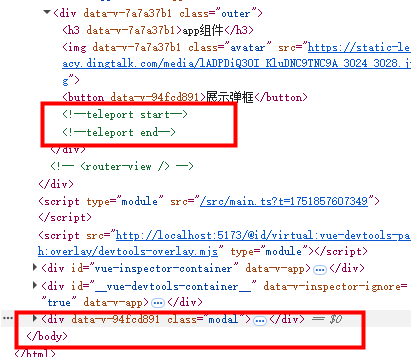
Suspense
具有异步功能的组件用 <Suspense> 包装。
<template>
  <div>{{ str }}</div>
</template>

<script setup>
import { ref } from 'vue'
await new Promise((resolve) => setTimeout(() => {
  resolve()
}, 2000))
let str = ref('你好,异步组件')
</script>
<Suspense>
<template #default>
<AsyncComponent />
</template>
<template v-slot:fallback>
<h3>Loading...</h3>
</template>
</Suspense>2s的Loading,后显示组件
样式穿透
| 写法 | 适用版本 | 现状 |
|---|---|---|
| >>> | Vue2( Sass/Less 等预处理器不认 >>>) | 已废弃,不推荐 |
| ::v-deep | Vue2 + Vue3 | 过渡方案 |
| :deep() | Vue3 | 官方推荐 |
全局 API 转移到应用对象
- app.component
- app.config
- app.directive
- app.mount
- app.unmount
- app.use