Appearance
接入AI模型
调用千问大模型API
申请百炼 API key:
https://bailian.console.aliyun.com/cn-beijing?tab=model#/api-key
文字问答
async chatWithAI(message) {
    let url = 'https://dashscope.aliyuncs.com/api/v1/services/aigc/text-generation/generation'
    const response = await fetch(url, {
        method: 'POST',
        credentials: 'omit',
        headers: {
            'Authorization': 'Bearer YOURTOKEN',
            'Content-Type': 'application/json'
        },
        body: JSON.stringify({
            model: 'qwen-plus',
            input: { messages: [{ role: 'user', content: message }] }
        })
    })
    const data = await response.json()
    return data.output.text
}
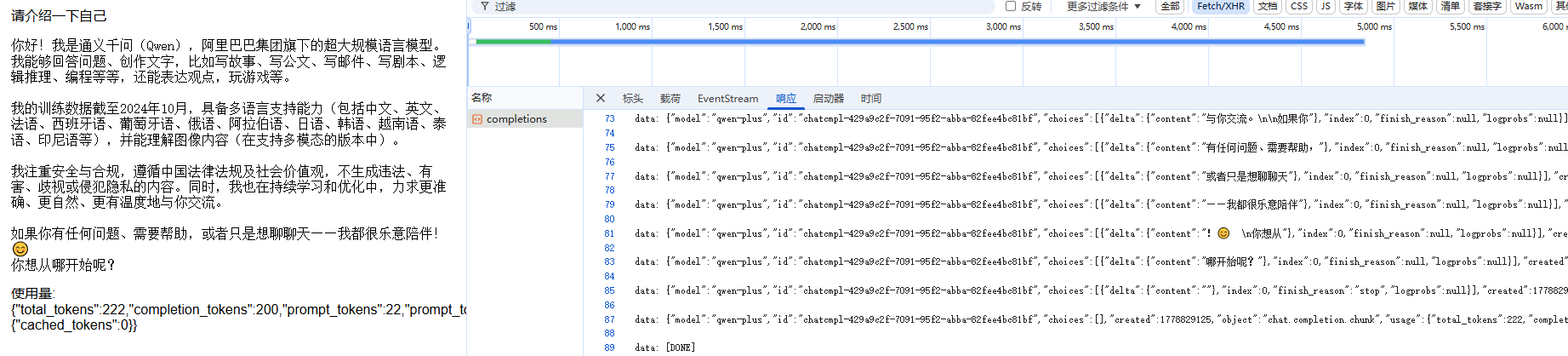
流式输出
<div @click="chatWithAIFn">请介绍一下自己</div>

<div class="chat-stream">
    <div v-if="chatStreaming">接收中...</div>
    <pre class="chat-content">{{ chatContent }}</pre>
    <div v-if="chatError" class="error">错误: {{ chatError.message }}</div>
    <div v-if="chatUsageRaw" class="usage">使用量: {{ chatUsageRaw }}</div>
</div>

chatStreaming: false, // 是否正在流式接收
chatContent: '', //存放流式输出文本
chatError: null,
chatUsageRaw: '', // 存放 usage 原始 JSON 字符串
chatWithAIFn() {
// 清空,开始接收
this.chatContent = ''
this.chatError = null
this.chatStreaming = true
this.chatWithAI().then(() => {
this.chatStreaming = false
}).catch(err => {
this.chatStreaming = false
this.chatError = err
this.$message.error('聊天失败')
console.error(err)
})
},
async chatWithAI() {
const url = 'https://dashscope.aliyuncs.com/compatible-mode/v1/chat/completions'
const response = await fetch(url, {
method: 'POST',
credentials: 'omit',
headers: {
'Content-Type': 'application/json',
'Authorization': `Bearer ******`
},
body: JSON.stringify({
model: 'qwen-plus',
messages: [
{ role: 'system', content: 'You are a helpful assistant.' },
{ role: 'user', content: '请介绍一下自己' }
],
stream: true, // 流式请求
stream_options: { include_usage: true }
})
})
if (!response.ok) {
const txt = await response.text()
throw new Error(`请求失败: ${response.status} ${txt}`)
}
// 如果服务器不返回流,直接返回整体文本
if (!response.body) {
const text = await response.text()
// 尝试从整体响应中解析 usage
try {
const j = JSON.parse(text)
if (j.usage) {
try { this.chatUsageRaw = JSON.stringify(j.usage) } catch (e) { this.chatUsageRaw = String(j.usage) }
}
if (j.choices && j.choices[0]) {
const finalText = (j.choices[0].message && j.choices[0].message.content) || j.choices[0].text || ''
this.chatContent += finalText
return finalText
}
} catch (e) {
// not JSON, treat as plain text
}
this.chatContent += text
return text
}
const reader = response.body.getReader()
const decoder = new TextDecoder('utf-8')
let done = false; let value; let buffer = ''
// 持续读取每个 chunk
while (!done) {
({ done, value } = await reader.read())
if (done) break
const chunk = decoder.decode(value, { stream: true })
buffer += chunk
// 处理常见的 SSE / data: ... 行格式(按行解析)
const lines = buffer.split('\n')
buffer = lines.pop() // 最后一行可能不完整,保留到下一次
for (const line of lines) {
if (!line.trim()) continue
// SSE 风格: data: {...}
if (line.startsWith('data:')) {
const dataStr = line.replace(/^data:\s*/, '')
if (dataStr === '[DONE]') {
// 完成信号
done = true
break
}
try {
const json = JSON.parse(dataStr)
// 如果包含 usage,保存为字符串(覆盖之前的)
if (json.usage) {
try {
this.chatUsageRaw = JSON.stringify(json.usage)
} catch (e) {
this.chatUsageRaw = String(json.usage)
}
}
// 根据常见的 stream JSON 结构提取文本(可根据实际接口调整)
let delta = ''
if (Array.isArray(json.choices)) {
json.choices.forEach(c => {
if (c.delta && c.delta.content) delta += c.delta.content
if (c.text) delta += c.text
})
} else if (json.text) {
delta = json.text
}
this.chatContent += delta
} catch (e) {
// 非 JSON,直接追加
this.chatContent += dataStr
}
} else {
// 不是 data: 行,直接追加
this.chatContent += line
}
}
}
// 处理剩余 buffer(若为 JSON 或纯文本)
if (buffer) {
try {
const json = JSON.parse(buffer)
if (json.usage) {
try { this.chatUsageRaw = JSON.stringify(json.usage) } catch (e) { this.chatUsageRaw = String(json.usage) }
}
if (json.choices && json.choices[0]) {
const finalText = (json.choices[0].message && json.choices[0].message.content) || json.choices[0].text || ''
this.chatContent += finalText
} else if (json.text) {
this.chatContent += json.text
} else {
this.chatContent += buffer
}
} catch (e) {
this.chatContent += buffer
}
buffer = ''
}
return this.chatContent
}
文档:
文生图
async chatWithAI(message) {
  let url = 'https://dashscope.aliyuncs.com/api/v1/services/aigc/multimodal-generation/generation'
  const response = await fetch(url, {
    method: 'POST',
    credentials: 'omit',
    headers: {
      'Authorization': 'Bearer YOURTOKEN',
      'Content-Type': 'application/json'
    },
    body: JSON.stringify({
      model: 'qwen-image-2.0-pro',
      input: { messages: [{ role: 'user', content: [{ text: message }] }] }
    })
  })
  const data = await response.json()
  return data.output.choices[0].message.content[0].image
}