Appearance
cli工具
命令行敲命令快速创建项目。
以简单版的创建 html 页面为例:
安装模块
交互式命令行工具: prompts
终端加颜色:picocolors
项目目录
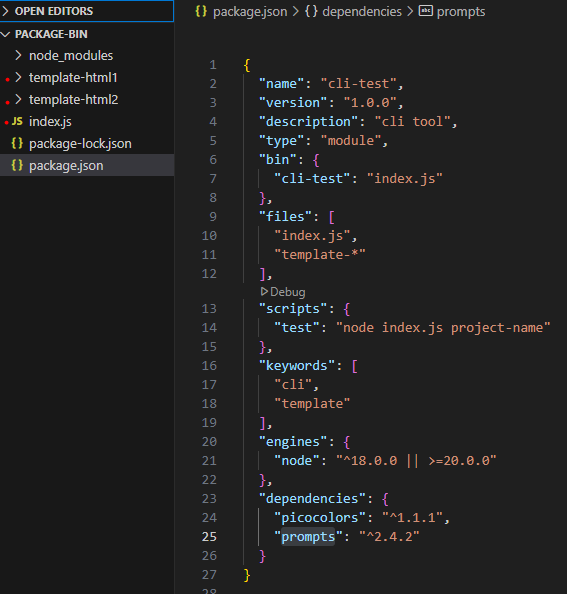
bin:把脚本变成命令行工具
入口文件 index.js
关键代码:
# 用 Node.js 执行这个文件
#!/usr/bin/env node

async function init() {
  // 项目名称(命令行可以输入默认值)
  const result = {}
  try {
    result.projectName = await prompts({
      type: 'text',
      name: 'projectName',
      message: reset('Project name:'),
      initial: targetDirectory,
      onState: (state) => {
        targetDirectory = formatTargetDirectory(state.value) || targetDirectory
      }
    })
  } catch (cancelled) {
    return
  }

  // 模板配置
  const TEMPLATES = [
    {
      name: 'html1',
      display: 'Html1',
      color: green
    },
    {
      name: 'html2',
      display: 'Html2',
      color: cyan
    }
  ]

  // 询问选择哪一个模板
  const templateResponse = await prompts({
    type: 'select',
    name: 'template',
    message: reset('Select a template:'),
    choices: TEMPLATES.map(template => ({
      title: template.color(template.display),
      value: template.name
    }))
  })

  template = templateResponse.template
  // ...

  // 创建目标目录
  fs.mkdirSync(rootDir, { recursive: true })

  // 写入模板文件
  const files = fs.readdirSync(templateDirectory)
  for (const file of files) {
    write(file)
  }

  // ...
}

init()
运行
方式1
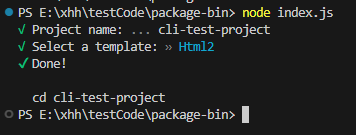
当前目录出现了 cli-test-project 文件夹,里面有 html2 模板文件。
方式2
npm link 到全局,在其他文件目下输入命令 cli-test 即可。
